AI Tools & Reviews
Turnitin Review: Plagiarism Checker, AI Detection Accuracy & Best Alternatives

If you are a student or teacher, you have probably heard people say, “Don’t worry, Turnitin will catch it.” But how true is that, really? In this Turnitin Review, we are going to look at how Turnitin actually works, how accurate it is in detecting plagiarism and AI-generated writing, and where it still falls short.
I will walk you through what the similarity report means, how it checks content for originality, and what to do if the score looks scary. By the end, you will know when to trust Turnitin, when to be careful, and how to use it in a smart, honest way that keeps your academic integrity safe.
If you also want a detailed look at a popular Turnitin alternative, you can read my in‑depth Copyleaks review for students and teachers on Techbasics101.com, where I test its AI detector and plagiarism checker side by side with real examples.
This guide keeps things simple. No sales pitch, no fear tactics. Just a clear walk‑through of what Turnitin does, how your school probably uses it, and how you can read the reports without panicking.
The review is for students, teachers, and parents who want straight answers about plagiarism detection, AI writing checks, and what those colors and percentages on the screen really mean.
What Is Turnitin and Who Is This Turnitin Review For?
Turnitin is a plagiarism-detection and originality-checking tool that schools use to protect academic integrity. It compares your writing to a huge database of web pages, journals, and past student papers, then shows matches in a similarity report.
Turnitin does things like:
- Text comparison against online content and stored papers
- Source matching that links your sentences to places they appear elsewhere
- Similarity reports that show a percentage score and a color code
- AI writing detection that estimates how much of the text might be written by tools like ChatGPT
\t
\t
\t
\t
People who use Turnitin include:
- Students who submit essays, lab reports, and research papers
- Teachers, professors, and tutors who review similarity reports
- Schools and universities that want to reduce academic misconduct
- Parents who are curious if Turnitin is fair and how strict it is
\t
\t
\t
\t
This Turnitin Review is written for all of them, with a particular focus on maintaining high content originality and low stress levels.
Quick overview: What Turnitin actually does
In simple terms, Turnitin:
- Takes your file when you submit an assignment
- Compares the text to its databases
- Marks any matching or very similar passages
- Produces a similarity report with a percentage score
- In newer versions, it adds an AI score that shows how likely some sections are AI‑generated
\t
\t
\t
\t
\t
It is important to know that Turnitin does not decide guilt. It does plagiarism detection and citation analysis by showing matches. Your teacher decides if those matches are a problem.
Why schools use Turnitin to protect academic integrity
High schools, colleges, and universities pay for Turnitin to support honest work and reduce copy‑paste assignments. It helps schools:
- Spot copy‑paste from websites and essay mills
- Detect collusion, where students share work or reuse old assignments
- Start conversations about proper citation and academic integrity
\t
\t
\t
For most classes, Turnitin is part of the normal workflow. You upload a paper, your teacher sees the similarity score, and you may never talk about it unless something looks odd. It is not only a punishment tool, though it is used in serious cases of academic misconduct.
Who should read this Turnitin Review (students, teachers, and parents)
This review is helpful if:
- You are a student who sees a 28% similarity and wonders if you are in trouble
- You are a teacher trying to decide how much to trust the AI writing score
- You are a parent who wants to know if Turnitin is fair to your child
\t
\t
\t
You will learn:
- How to read similarity ranges and what is “normal”
- How accurate is Turnitin for AI writing in 2025
- How to avoid common mistakes that trigger high scores or false alarms
\t
\t
\t
How Turnitin Works Step by Step (From Upload to Similarity Report)
Turnitin feels like a black box to many students. The actual process is clear once you break it into steps.
From assignment to upload: How your paper gets into Turnitin
Most students never go to the Turnitin website directly. Instead, you:
- Upload your work in your school’s learning system (Canvas, Moodle, Blackboard, etc.), where a Turnitin checker for students is built into the assignment
- Or your teacher creates a Turnitin assignment and you upload there
- In some cases, a teacher uploads your file manually on their side
\t
\t
\t
Your school manages the Turnitin sign-up and access. You usually log in with your school account, not a personal Turnitin account.
What does Turnitin checks your writing against
When your paper reaches Turnitin, it runs text comparison against:
- Billions of current and archived web pages
- Academic journals, e‑books, and professional content
- A large database of past student papers from many institutions
\t
\t
\t
This wide database lets Turnitin catch:
- Direct copy‑paste from the internet
- Reuse of old assignments
- Collusion where two students share work or use the same draft
\t
\t
\t
It cannot match content that does not exist in its databases. If you write something truly original, there is nothing to match. For a student‑friendly overview, Turnitin provides a guide on how the similarity score works.
How the similarity score is calculated and what it really means
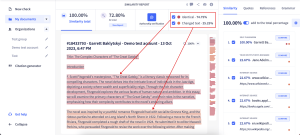
The similarity score is the percentage of your text that Turnitin finds matching or highly similar to its sources. It is not the percentage of plagiarism.
Quotes, correctly cited passages, and common phrases all increase the similarity number. Teachers can adjust settings to:
- Exclude the reference list or bibliography
- Ignore small matches below a certain number of words
- Exclude quoted material in quotation marks
\t
\t
\t
Turnitin also explains this in its instructor guide on understanding the similarity score. Later in this Turnitin similarity index guide, there is a simple table that shows standard ranges and how to read them.
How Turnitin’s AI writing detection works in simple language
Turnitin’s AI detector looks for patterns in your writing. It checks things like:
- Very regular sentence length and structure
- Simple, generic word choice used in a very steady pattern
- Lack of personal detail or natural variation
\t
\t
\t
It then provides an AI score indicating how much of the text may be AI‑generated. This is a probability, not a final verdict. Fully AI‑written essays are usually easier to flag. Mixed text, where you use AI for a draft and then edit, is more complex.
Independent tests, such as the review of Turnitin’s AI detector by BestColleges, show that it performs well on pure AI-generated text but can struggle with heavily edited human text or short passages.
How Accurate Is Turnitin Really? (Plagiarism, Similarity, and AI Checks)
This section is the core of this Turnitin Review. Accuracy matters if scores can affect grades or misconduct cases.
Is Turnitin really that accurate?
Turnitin is powerful at finding exact matches, but it is not perfect. Its accuracy depends on three areas:
- Plagiarism detection: Turnitin is highly reliable at spotting copy‑paste and close paraphrasing from its databases. If a passage comes from a known source, it usually appears in the report.
- Similarity report quality: The report is clear and detailed, but it still needs human judgment. A 30% score with correct citations can be fine, while a 10% score with one copied paragraph can be serious.
- AI writing detection: Turnitin claims about 98% accuracy on clear AI text with a low false positive rate. Public tests and reviews show it is good, but false positives and misses still happen, especially with mixed AI plus human editing.
\t
\t
\t
Teachers should treat Turnitin as a strong tool, not a final judge.
Can Turnitin actually detect ChatGPT and other AI tools?
Yes, Turnitin can often detect essays written by ChatGPT and similar tools, but not always.
The AI detector analyzes writing style and probability patterns, not a database of AI outputs. That means:
- A full essay copied straight from ChatGPT is very likely to be flagged as AI‑generated
- An essay where AI wrote a draft and the student rewrote many parts may show only a moderate AI score
- A short paragraph pasted from ChatGPT into an otherwise human paper may slip through
\t
\t
\t
Turnitin’s AI scores are indicators, not proof. Reviews such as the Turnitin AI checker analysis from Quetext point out that heavy editing, “AI humanizer” tools, and strong writers who revise a lot can confuse detectors.
Real‑world examples: When Turnitin flags honest work
Some common scenarios:
- 35% similarity from poor paraphrasing
A student rewrites Wikipedia by swapping words but keeps the same sentence structure. Turnitin shows about 35% similarity, mostly from one site. The work is not copy‑paste, but it is still too close. The teacher sees this as weak paraphrasing and a citation problem.
- 15% similarity on an original essay
A student writes their own essay but uses many standard phrases and a few long quotes, properly cited. The report shows 15% similarity across several sources. This is usually fine if the highlights are in quotes or reference sections.
- Group project with shared text
Three students submit parts of the same group report. Turnitin flags each paper for high similarity with each other. This is collusion only if the teacher expected fully separate writing. Context decides.
- AI‑assisted draft with medium AI score
A student uses ChatGPT to brainstorm, then rewrites much of it in their own voice. Turnitin reports a moderate AI score. The teacher may ask questions, but after reading, can see strong personal style and changes.
\t
\t
\t
\t
In each case, the teacher must read the paper and the report, not just the number.
How reliable is Turnitin’s AI detection in 2025?
Public data and independent tests in 2025 show:
- Turnitin’s AI detector is usually accurate on fully AI‑generated text
- It can miss some AI writing, especially when a human edits heavily
- It can flag some human work, especially from non‑native speakers or writers with a very repetitive style
\t
\t
\t
Some studies on AI detectors in general, such as those reported by SkylineAcademic, show high false-positive rates across tools. Turnitin has tried to reduce this by hiding very low AI scores and focusing on stronger signals.
Schools are advised to treat AI scores as a starting point for a conversation, not as automatic proof of cheating.
Turnitin Scores Explained: Similarity Percent, AI Score, and What Is “Normal”
Many students only see a color and a number. This section explains what they usually mean.
Is 25% similarity on Turnitin okay?
In many cases, 25% is normal, but it depends on your teacher and the assignment.
For research papers, that 25% might include:
- Properly quoted passages
- Reference lists and titles
- Common academic phrases and topic‑specific terms
\t
\t
\t
Here is a simple guideline:
| Similarity range | Typical meaning |
|---|---|
| 0–10% | Very low, often short or very original work. |
| 10–25% | Common for research papers with quotes and sources. |
| 25–40% | Needs a closer look at what is matching. |
| 40%+ | Big red flag, often large copied sections. |
If you see a score you did not expect, open the report, look at what is highlighted, and then talk to your teacher about it. Some colleges, like those that publish a student guide to similarity scores, also give their own color codes and ranges.
Does Turnitin store my paper and check old work too?
In most schools, Turnitin stores student papers in its database so it can check future submissions against them. This helps stop:
- Reusing the same paper in another class
- Sharing documents with friends or siblings
- Selling assignments online
\t
\t
\t
Some institutions use only an internal database. Others allow Turnitin to share anonymous matches across many schools. Storage time and settings vary, so students who have privacy concerns should ask their school how long papers stay in the system and what database options they use.
Can Turnitin detect paraphrasing tools and reworded text?
Turnitin often detects lazy paraphrasing, where the structure is the same and only a few words change. The report shows long sections that match a single source, with many partial-sentence overlaps.
More advanced paraphrasing tools that deeply rewrite structure and wording are harder to detect with pure text comparison. However, teachers can still notice sudden changes in voice, vocabulary, or sentence style within a single paper.
Trying to “beat” Turnitin with paraphrasing tools is risky. It can lead to awkward writing, missed concepts, and may still appear as suspicious similarity or AI‑style text.
Turnitin mainly checks text. It does not read text inside images or screenshots unless your school uses other tools to convert photos to text first.
How long does Turnitin take to check a paper?
Turnitin usually returns a similarity report in a few minutes. Timing depends on:
- Server load at busy times
- Settings your teacher chooses, such as generating reports only after the due date
- How often you resubmit the same assignment
\t
\t
\t
If you upload many times in a short period, Turnitin may slow down reports. To avoid last‑minute stress, submit early so there is time to see and discuss the report if needed.
Using Turnitin in Real Life: Pros, Cons, and Smart Tips for Students and Teachers
This part of the Turnitin Review looks at what works well and what regularly annoys users.
Pros of Turnitin for students and teachers
Key advantages:
- Strong plagiarism detection with a very large database
- Clear similarity reports with color‑coded highlights
- Support for academic integrity policies
- Helpful for finding collusion and recycled essays
- Useful for teaching better citation and paraphrasing
\t
\t
\t
\t
\t
Teachers can show students the report to explain why a passage needs a citation or why copying and pasting from lecture slides is not okay.
Cons and common complaints about Turnitin
Common issues include:
- No direct, official Turnitin checker is free for students outside institutions
- Stress over similarity percentages even when work is honest
- False positives in AI detection, especially for some writing styles
- Confusing AI scores that are not always well-explained in class
- Worries about long‑term storage of student work
\t
\t
\t
\t
\t
Clear communication helps. When teachers explain the range they expect for each assignment, students worry less about every single percentage point.
Smart tips for students: How to read and use your Turnitin report
If you can see your similarity report, treat it like feedback, not a final label.
- Stay calm when you see the score.
- Open the report and click on the colored highlights.
- Check if the matches are:
- Proper quotes you cited
- Reference lists or titles
- Real problems where you copied wording or structure
\t
\t
\t
\t
\t
\t
If you see large blocks of highlighted text from one source, rewrite those ideas in your own words and add clear citations. Use AI tools only for brainstorming or small edits, not to write full papers, and keep your own voice strong.
Smart tips for teachers: Using Turnitin as a teaching tool, not just a detector
Teachers get better results when they:
- Share expected similarity ranges in the syllabus
- Review reports in context instead of judging only by the number
- Use examples from reports to show good citation and poor paraphrasing
- Treat AI scores as conversation starters, not final proof
- Read any paper with very high AI or similarity scores carefully before acting
\t
\t
\t
\t
\t
This approach keeps the focus on learning and academic integrity, rather than solely on punishment.
Common mistakes people make with Turnitin (and how to avoid them)
Frequent errors include:
- Assuming a low similarity score always means good, original work
- Assuming a high score always means plagiarism
- Reusing a friend’s old paper and hoping the teacher will not notice
- Uploading work to random “free Turnitin checker” sites that may store or resell content
- Letting AI write whole assignments to “beat the system”
\t
\t
\t
\t
\t
Safer options for self‑checks include well‑known plagiarism checkers and Turnitin alternatives that openly explain how they handle your data.
Turnitin Access, Pricing, and Best Alternatives for Students in 2025
Turnitin is built for schools, not for individuals. This section explains how that affects students looking for a Turnitin checker for students at home.
Can I use Turnitin for free?
Usually, you cannot get a direct free Turnitin account as a student.
Access usually works like this:
- Your school, college, or university pays the Turnitin price as an institutional subscription
- You access Turnitin through your learning system or a class link
- There is no official Turnitin checker free website for the public
\t
\t
\t
Be very careful with sites that claim to offer a “free Turnitin check.” Turnitin does not own them and may keep or misuse your text. For personal checks, use trusted plagiarism tools instead. If you want something that feels close to a Turnitin checker for students, my Copyleaks Review: AI detector, plagiarism checker, and Turnitin alternative explains how Copyleaks works, what it costs, and how well it spots AI and copied text.
Turnitin sign up, Turnitin price, and where to find your Turnitin ID
Turnitin sells licenses to institutions. Prices vary by size and region, and schools usually do not share per‑student costs.
For students:
- You do not sign up on the Turnitin homepage with your own money
- You log in through your LMS or with credentials your school provides
- Your Turnitin ID is usually the submission ID or paper ID shown on the digital receipt or in your LMS after you submit
\t
\t
\t
Teachers may ask for that ID when they check whether a submission went through correctly.
Best Turnitin alternatives for students and writers
If your school does not use Turnitin, or if you want to self‑check before submitting, several Turnitin alternatives exist. One of the strongest student‑friendly options I have tested is Copyleaks, which I cover in detail in this Copyleaks vs Turnitin comparison for students and teachers.
Some popular options include tools listed in:
- Quetext’s page on Turnitin alternatives and plagiarism checkers
- Paperpal’s guide to Turnitin alternatives for students and researchers
- PlagiarismCheck.org’s online plagiarism checker and AI detector
- Plag.ai’s plagiarism checker and AI detector
\t
\t
\t
\t
A simple comparison looks like this:
| Tool | Database size | AI detection | Typical access | Best for |
|---|---|---|---|---|
| Turnitin | Very large, many schools | Yes | Schools only | Institutions, formal assessments |
| Grammarly* | Large web + ProQuest | Limited | Personal subscription | Students, freelance writers |
| Quetext | Web + academic sources | Yes | Free + paid tiers | Students self‑checking drafts |
| PlagiarismCheck | Web + internal DB | Yes | Personal or school | Writers needing AI + plagiarism |
| Plag.ai | Web + custom sources | Yes | Personal or school | Users focused on AI detection |
*Grammarly mentioned via third‑party reviews, such as the plagiarism checker comparison on Grammarly.
For a Turnitin Review for students, the main point is simple: Turnitin is strongest inside schools; outside, you are better off with one of these alternatives.
What Real Students and Teachers Say About Turnitin
User opinions shape how Turnitin feels in day‑to‑day classes.
Student reactions: helpful safety net or stress machine?
Students often describe Turnitin in two main ways:
- As a safety net, because it helps catch mistakes before a teacher calls it plagiarism
- As a stress source, because the similarity score feels like a grade by itself
\t
\t
Many say they learned to:
- Start assignments earlier
- Cite sources more carefully
- Paraphrase instead of copy‑paste
\t
\t
\t
Others complain about:
- False AI flags when they wrote everything themselves
- Teachers who rely only on the percentage without reading the report
\t
\t
These mixed feelings show why clear instructions about scores and expectations matter.
Teacher reactions: powerful tool that still needs human judgment
Teachers generally see Turnitin as a powerful time‑saver:
- It quickly highlights sections that may be copied
- It helps spot patterns of academic misconduct across classes
- It supports school policies on academic integrity
\t
\t
\t
At the same time, many instructors report:
- Extra work explaining similarity and AI scores to anxious students
- Concerns about false positives, especially with AI detection
- A firm belief that they still need to read any suspicious paper in full
\t
\t
\t
Most agree on one point: Turnitin works best when there is open discussion about how it is used and what the scores mean.
Conclusion
Turnitin is a strong originality-checking and plagiarism-detection tool, with a large database and a growing set of AI writing features. It does a good job at finding copied text and often spots pure AI essays, but it still makes mistakes and cannot replace human judgment.
For students, the main goal is to keep academic integrity at the center. Please write in your own voice, use sources to support your claims, cite them clearly, and treat similarity reports and AI scores as feedback, not as final labels. For teachers, Turnitin works best as a starting point for conversation, not as an automatic verdict.
If you want more help with plagiarism, AI tools for homework, or study strategies, explore the guides on TechBasics101.com and use this Turnitin Review as a reference each time a new score appears on your screen.