ChatGPT Resume Tips: How To Write a Human Resume With AI

Every week, more people type “ChatGPT Resume Tips” into Google, hoping for a faster way to write a resume in 2025. ChatGPT is an AI tool that reads your prompts, then suggests ideas, wording, and structure. It can help you sound clearer and more confident, but it cannot know your real results, and it should not replace your own judgment or voice.
Recruiters and hiring managers now see many copy-pasted AI resumes, and they can often spot them in seconds. This guide shows how to use ChatGPT as a smart helper, while you stay in control, so your resume still sounds human and honest. If you are also exploring future roles that use AI, such as the path described in this Practical Roadmap for AI Careers 2026, these skills will matter even more.
Here you will learn practical ChatGPT Resume Tips for real job searches. The guide walks through first drafts, tailoring your resume to each job, handling career gaps or career changes, writing for ATS, and keeping your resume, cover letter, and LinkedIn in sync. By the end, you will know how to get strong AI support and still send a resume that sounds like you, not a robot.
Why ChatGPT Resume Tips Matter in 2025 (And What Makes This Guide Different)
By 2025, recruiters expect candidates to use tools like ChatGPT, but they also expect resumes to sound human. Many people now use AI to write job materials, so hiring teams are quicker to spot generic, copied text. Strong ChatGPT Resume Tips help you smartly use the tool, so your resume is faster to write, easier to read, and still true to your story.
This guide treats ChatGPT as support, not as a replacement for your own judgment. You stay in charge of the facts, the tone, and the final version that you send out.
How ChatGPT Fits Into Modern Resume Writing
ChatGPT works best as a smart writing partner, not as an automatic resume machine. It can help you shape what you already know about your work, then present it in a clear, structured way.
Used well, ChatGPT can:
-
\t
- Turn rough notes into complete sentences
- Suggest bullet points based on your role and goals
- Offer multiple versions of a summary or headline
- Tighten long paragraphs so they are easier to scan
\t
\t
\t
You still supply the real content. ChatGPT does not know your actual sales numbers, client wins, or project impact. You need to feed it facts, such as:
-
\t
- Job titles and dates
- Key responsibilities
- Real metrics, like revenue, response time, or user growth
- Tools, software, and methods you used
\t
\t
\t
A typical process looks simple:
-
\t
- You list your tasks and achievements in plain language.
- You paste those notes into ChatGPT with clear instructions.
- ChatGPT turns them into resume bullets or a summary.
- You edit the text so it sounds like you and matches your target role.
\t
\t
\t
ChatGPT is strongest at structure and clarity. It helps you focus on results, remove vague wording, and keep the resume aligned with a job description. It is not meant to invent a career story or fill in gaps with fake numbers.
You are responsible for:
-
\t
- Checking accuracy
- Fixing any wrong assumptions
- Adjusting tone so it fits your voice and industry
- Making final cuts so the resume fits one or two pages
\t
\t
\t
Used in this way, ChatGPT becomes a powerful editor and assistant, not a ghostwriter that speaks for you.
Why Recruiters Still Want a Human Voice, Not a Robot Resume
Recruiters skim dozens of resumes in a short time. Many spend only a few seconds on each one before deciding whether to read more. In that short scan, they look for clear results, honest details, and hints of personality.
Common red flags in AI-heavy resumes include:
-
\t
- Long chains of buzzwords with no proof of results
- Overused phrases like “results-driven professional” or “highly motivated individual”
- Identical sentence structures across every bullet
- Vague claims such as “improved processes” with no context or numbers
\t
\t
\t
These patterns suggest the candidate pasted AI output without personal review. That can raise doubts about attention to detail or authenticity.
Recruiters respond better to resumes that:
-
\t
- Show specific outcomes, such as “Reduced response time by 30%”
- Use simple, direct language
- Reflect the way a real person in that field would speak
- Include details that feel grounded, such as team size or tools used
\t
\t
\t
In this guide, you use ChatGPT Resume Tips to get a strong draft, then you add a human layer. That means:
-
\t
- Keeping AI suggestions that are clear and accurate
- Rewriting parts that feel stiff, over formal, or generic
- Inserting your real examples, stories, and numbers
- Reading the text out loud to check if it sounds like you
\t
\t
\t
The result is a resume that benefits from AI speed and structure, but still reads as a real person talking about real work.
What You Will Get From These ChatGPT Resume Tips
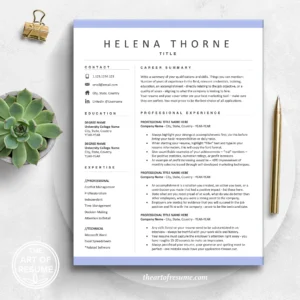
This guide is built as a practical playbook, not just a list of generic AI advice. It focuses on what you can do today for your next application.
You will get:
-
\t
- Step-by-step prompts for building a resume from scratch, even if you only have messy notes right now.
- Targeted tailoring methods that show how to match a resume to each job posting without copying the description.
- Tips for special cases, including:
-
\t
- Career gaps
- Career changes into new fields
- Freelance, contract, and remote work
\t
\t
- ATS-friendly formatting guidance, with clear rules for headings, bullet structure, and keywords so applicant tracking systems can read your file correctly.
- Support for your whole job search story, including how your resume, cover letter, and LinkedIn profile can share a consistent message when you use ChatGPT wisely.
\t
\t
\t
\t
You will also see example prompts you can copy and adjust. Each prompt is written so you can paste it into ChatGPT, add your own details, then refine the output. This makes the process repeatable, whether you are applying to one role or managing several versions of your resume in 2025.
Step by Step ChatGPT Resume Guide: From Blank Page to Strong First Draft
This section turns general ChatGPT Resume Tips into a clear process you can follow. The goal is a solid first draft that reflects your real work, not a generic AI script. Each step builds on the last, so you move from raw notes to a resume that is structured, focused, and ready for human editing.
Step 1: Gather Your Job History, Skills, and Achievements Before You Open ChatGPT
ChatGPT can only work with what you give it. Strong input leads to strong output. Weak or incomplete notes lead to a resume that feels vague and thin.
Before you open ChatGPT, gather your raw material in a simple document or spreadsheet. It does not need to look pretty. It only needs to be clear.
Key items to list for each job:
-
\t
- Job title
- Company name and location
- Start and end dates
- 3 to 7 main tasks or responsibilities
- 3 to 5 results or achievements
\t
\t
\t
\t
Add sections for:
-
\t
- Skills and tools, for example, Excel, Figma, SQL, and HubSpot
- Education, degrees, and key certifications
- Volunteer work, projects, or internships, if they are relevant
\t
\t
The most useful ChatGPT Resume Tips focus on numbers. Try to write down real metrics, even if they are rough:
-
\t
- How much money did you help save or earn
- How many customers or users have you served
- How many tickets, calls, or cases did you handle per day or week
- How much time did you save the team
\t
\t
\t
Examples:
-
\t
- “Handled about 40 customer chats per day”
- “Reduced report prep time from 3 hours to 1 hour”
- “Helped grow newsletter from 1,000 to 3,500 subscribers”
\t
\t
You can store all of this in:
-
\t
- A Word or Google Docs file
- A basic spreadsheet with one row per job
- Notes on your phone, as long as you can copy and paste
\t
\t
Once you have this information, ChatGPT can turn it into structured bullets and sections instead of guessing.
Step 2: Use a Strong Base Prompt To Let ChatGPT Build a Resume Outline
With your notes ready, the next step is to guide ChatGPT with a clear base prompt. This is where many people go wrong. They type “write my resume” and get a generic result that could belong to anyone.
A strong base prompt includes:
-
\t
- Your field or industry
- Your target job title
- Your years of experience
- Your location if it matters
- The notes you collected in Step 1
\t
\t
\t
\t
You can use a template like this, then fill in your details:
“Act as a professional resume writer. I am applying for a [target job title] role in [field or industry] with [X] years of experience. Organize my information into a professional resume with these sections: summary, work experience, skills, and education. Use clear bullets, simple language, and a professional tone. Here are my notes, then rewrite them into a strong first draft:
[Paste your job history, achievements, skills, and education here.]”
This base prompt tells ChatGPT:
-
\t
- What type of resume you need
- What structure to use
- What style to follow
\t
\t
Always paste your own notes into the prompt. ChatGPT Resume Tips work best when the tool starts from your real data, not its own assumptions.
Step 3: Ask ChatGPT To Write a Clear Resume Summary, Work Bullets, and Skills Section
Once you have an outline, you can focus on the key parts of your resume: the summary, the work bullets, and the skills list. Each part needs a clear, simple prompt.
A resume summary is a short 2 to 4 line paragraph at the top. It describes who you are, your main strengths, and what you bring to the role. It is not an objective statement. An objective talks about what you want. A summary talks about what you offer.
Prompt example for a summary:
“Write a 3 sentence professional resume summary for a [target job title] in [industry] using my experience below. Focus on my top skills and results. Avoid buzzwords and keep the language simple and direct.”
Then paste your notes again or refer to the previous draft.
For work experience bullets, you want short, action based lines. Each bullet should be one or two lines at most.
Prompt example for bullets:
“Rewrite my work experience below into resume bullets. Start each bullet with a strong action verb. Keep each bullet to one or two lines. Focus on clear tasks and results. Avoid long sentences and avoid buzzwords.”
For the skills section, you want a focused list, not a random mix of terms.
Prompt example for skills:
“Create a skills section for my resume using the tools and skills in my notes below. Group them into 2 or 3 categories, for example Technical Skills, Tools, and Soft Skills. Use short phrases, not full sentences.”
These targeted prompts give ChatGPT clear instructions. This is where structured ChatGPT Resume Tips save you time and prevent bloated, unclear text.
Step 4: Turn ChatGPT Bullets Into Results That Recruiters Notice
At this stage, you likely have basic bullets that describe what you did. The next step is to highlight results. Recruiters read for impact, not just duties.
Ask ChatGPT to rewrite plain bullets into result-based statements. You want action verb + task + outcome, and numbers when possible.
Example of a weak bullet:
-
\t
- “Responsible for answering customer emails and resolving issues”
Stronger version:
-
\t
- “Resolved 30 to 40 customer email requests per day, kept average response time under 2 hours”
Another example:
Weak:
-
\t
- “Helped with monthly reports for management”
Strong:
-
\t
- “Prepared monthly performance reports for managers, cut reporting time by 50 percent by improving spreadsheet templates.”
Prompt example:
“Take the resume bullets below and rewrite them to focus on achievements, not just duties. Start each bullet with a strong action verb. Add specific numbers or outcomes when possible. Keep each bullet to one or two lines and avoid buzzwords.”
Paste in the current work experience section from your draft. Review the new bullets and compare them with your own memory of results. If a number is not accurate, change it. ChatGPT Resume Tips are not a reason to guess or inflate achievements.
Step 5: Edit By Hand So Your Resume Sounds Human and Looks Clean
This final step is not optional. Even the best AI draft needs a human review. Recruiters should feel that a real person wrote the resume.
Key checks:
-
\t
- Read every line out loud. If a phrase does not sound like something you would say, rewrite it.
- Remove any repeated buzzwords or filler, such as “results driven” or “dynamic professional.”
- Fix typos, numbers, and job titles that ChatGPT may have misunderstood.
- Confirm that all dates, company names, and locations are correct.
\t
\t
\t
Formatting basics:
-
\t
- Use a simple, readable font, such as Arial, Calibri, or Times New Roman.
- Keep clear headings for Summary, Experience, Skills, and Education.
- Use standard bullet points, not icons or graphics.
- Aim for one page if you have under 10 years of experience, or two pages if you have more.
- Avoid charts, text boxes, and complex layouts that can confuse ATS systems.
\t
\t
\t
\t
Save your resume in common formats that employers expect. If you need a refresher on file types and how they work, you can review a guide like Understanding Common File Formats.
Many strong ChatGPT Resume Tips end with the same advice. Let AI help you get to a clear draft, then rely on your own eyes and judgment to make sure it is honest, readable, and human.
Best ChatGPT Resume Tips for Beginners, Students, and Career Changes
This section focuses on practical ChatGPT Resume Tips for people who are early in their careers, changing direction, or managing nontraditional work. The goal is the same in each case: turn real experience into clear, targeted bullets that hiring managers can scan in seconds.
Using ChatGPT When You Have Little or No Work Experience
Students and new graduates often have more to show than they think. School projects, clubs, part time jobs, and volunteer work all count as experience when described in clear, results based language.
Useful sources of content include:
-
\t
- Course projects and capstones
- Research or lab work
- Student clubs and leadership roles
- Part-time retail, food service, or campus jobs
- Community service or unpaid internships
\t
\t
\t
\t
A simple prompt structure helps ChatGPT turn this into an entry-level resume:
“Act as a resume writer. Create a one page student resume for an entry level [target role]. Use sections for summary, education, projects, experience, and skills. Here are my details:
-
\t
- Degree and school: [details]
- Key classes or tools: [details]
- Projects with what I did and results: [details]
- Clubs or leadership: [details]
- Part-time jobs or volunteer work: [details]”
\t
\t
\t
\t
To highlight soft skills without sounding generic, ask for concrete examples:
“From this information, highlight soft skills like teamwork, communication, and learning speed. Use specific actions and outcomes, not vague phrases. Avoid terms like ‘team player’ or ‘hard worker’. Show how I worked with others, met deadlines, or learned tools quickly.”
For more ideas on which skills to feature, students can study the Top 20 Skills for Your 2025 Resume.
ChatGPT Resume Help for Internships and First Jobs
Targeting internships and first full-time roles requires focus. The resume should link school work and projects directly to the posting and stay on one page.
The core process is simple:
-
\t
- Copy the full internship or entry-level job posting.
- Paste it into ChatGPT with your resume notes.
- Ask ChatGPT to match your experience to the key requirements.
\t
\t
Example prompt:
“Act as a professional resume writer. I am applying for this internship: [paste job posting]. Using my education, projects, and any work experience below, create a one-page resume focused on this role.
-
\t
- Keep sections to summary, education, relevant projects, and experience.
- Use no more than 5 bullets total under experience.
- Emphasize the skills and tools mentioned in the posting if I actually used them.
Here is my information: [paste notes].”
\t
\t
To keep the resume tight:
“Review this draft resume. Cut any bullets that are not relevant to the internship. Make sure it fits on one page and that the most recent education and projects appear first.”
This approach keeps ChatGPT Resume Tips practical and aligned with what employers list in their ads.
How To Use ChatGPT for Career Change Resumes
Career changers need to show how past work supports a new field. ChatGPT can help surface transferable skills such as leadership, customer service, data analysis, or operations.
Start by listing past roles, key tasks, and measurable results. Then define the new target role clearly.
Example prompt:
“I am changing careers from [old role/field] to [target role/field]. Use my work history below to find transferable skills that match the new role, such as leadership, customer service, or data analysis.
-
\t
- Write a 3-sentence summary that positions me for the new field, without exaggerating my experience.
- Rewrite my work bullets so they highlight skills relevant to [target role].
- Keep all examples honest and based only on the tasks and results I list. Do not invent new responsibilities.”
\t
\t
Then paste:
-
\t
- Job titles, companies, and dates
- Main tasks and tools
- Results with numbers when possible
\t
\t
A second follow-up prompt can refine the tone:
“Review this resume text and remove any buzzword heavy language. Keep it current, simple, and focused on results, not fluff.”
Career changers who want stronger skills sections can also review a guide like 2025 Resume Skills That Stand Out.
Freelance, Contract, and Remote Work: Showing Your Value With ChatGPT
Freelancers and contract workers often collect many short projects. Grouping them into a clear section helps hiring managers see stability and value.
A simple structure looks like this:
-
\t
- Section title: “Freelance [Role]” or “Independent Contractor”
- Subheading: “Selected Projects”
- 3 to 7 bullets focused on outcomes
\t
\t
Prompt example:
“Act as a resume writer. I do freelance and contract work as a [role]. I will give you a list of projects with client type, what I did, and the result.
-
\t
- Group them under one ‘Freelance [Role]’ experience section.
- Combine similar small gigs into single bullets where possible.
- Focus each bullet on outcomes, such as revenue gained, time saved, or processes improved.
- Keep each bullet to one or two lines.
Here are my projects: [paste list with dates, client type, work, and results].”
\t
\t
\t
To highlight remote work strengths:
“From the same information, mention remote work skills such as self management, meeting deadlines without supervision, and clear written communication. Use specific examples, such as on time delivery, regular client updates, or managing work across time zones.”
Short, outcome-focused bullets give a clearer picture than long project descriptions or long lists of tools.
Modernizing Your Resume With ChatGPT if You Have Many Years of Experience
Experienced workers often carry long resumes with outdated sections and old technology. ChatGPT can help reduce, update, and refocus this history.
Start with a clear instruction:
“I have over [X] years of experience. Modernize my resume using the notes below.
-
\t
- Focus on the last 10 to 15 years.
- Keep older roles very brief, or group them into an ‘Earlier Experience’ section.
- Remove outdated tools and technologies that are no longer used in my field.
- Keep the language current and simple, but do not fill it with buzzwords.
- Highlight my biggest results and leadership outcomes.”
\t
\t
\t
\t
After pasting the full history, ask for trimming:
“Cut this down to a two page resume. Keep the strongest results and most recent roles. Remove any repeated bullets and combine similar responsibilities into single lines.”
A final pass can address tone:
“Review the wording and update it so it sounds current for 2025. Avoid phrases that feel old fashioned. Keep verbs active, such as ‘led’, ‘built’, ‘improved’, and focus on measurable impact where possible.”
Used this way, ChatGPT Resume Tips help long-time professionals present a sharper story that fits modern expectations without losing key achievements.
How To Use ChatGPT To Tailor Your Resume to Each Job (Without Sounding Fake)
Tailoring a resume for each job is one of the strongest ChatGPT Resume Tips you can use. Recruiters want to see a clear match between your experience and their posting, not a one-size-fits-all document. ChatGPT can help you pull out the right keywords, adjust your summary and bullets, and still keep your own voice.
Step by Step: Paste the Job Description and Match the Right Keywords
The first step is simple. Copy the full job description from the posting, including responsibilities, required skills, and preferred qualifications. Paste it into ChatGPT and ask it to highlight what matters most.
You can start with a direct prompt like:
“Here is a job description for a [target role]. Identify the top 10 to 15 keywords, skills, and tools that are most important for this role. Include both hard skills, for example software and tools, and soft skills, for example collaboration or communication. List them in order of importance.”
ChatGPT will usually return a short list of:
-
\t
- Core skills and tasks
- Tools and software
- Key keywords, such as “customer support”, “stakeholder management”, or “SQL”
\t
\t
Use that list as a checklist, not a script. The goal is to weave these terms into your resume naturally, where they are true for you.
Practical ways to include the keywords:
-
\t
- Add relevant tools to your skills section if you have actually used them.
- Adjust a few bullets so they mention the same terms the posting uses, for example, change “clients” to “customers” if that matches the ad.
- Reference the same type of projects, such as “campaigns”, “roadmaps”, or “workflows”, when they match your work.
\t
\t
Avoid dropping keywords in a separate block or stuffing them into a long list. Applicant tracking systems read for context. Recruiters do too. Keywords work best when they sit inside real bullets that show how you used the skill in your day-to-day work.
Ask ChatGPT To Rewrite Your Summary and Bullets for That Specific Role
Once you know the key terms, you can ask ChatGPT to adjust your summary and a few important bullets to match the posting. You keep the structure of your resume, and ChatGPT helps you tune the content.
You can use a prompt like this:
“I will paste my current resume summary, top skills, and 6 to 8 important bullets, plus a job description for a role I want. Rewrite my summary, skills, and these bullets so they align with this specific role.
-
\t
- Keep my facts, titles, and numbers the same.
- Use language that matches the job description where it fits.
- Keep the structure similar, just adjust the wording.
Here is the job description:
[Paste job description]
\t
\t
Here is my current resume text:
[Paste summary, skills, and key bullets]”
This type of prompt tells ChatGPT to act as an editor, not a ghostwriter. You still control:
-
\t
- Section order
- Number of bullets
- Main achievements
\t
\t
After ChatGPT returns an updated version, read slowly through each part:
-
\t
- Check that every claim is accurate and reflects the work you have actually done.
- Remove any skills or tools that you do not want to be tested on.
- Keep the pieces that sound clear, honest, and focused on the target role.
- Rewrite any line that feels like it belongs to someone else.
\t
\t
\t
Think of this as a tuning pass. You are sharpening your resume for a single job, not rebuilding it from scratch.
Avoiding Copy-Paste: How To Keep Your Own Voice While Using ChatGPT
Copying ChatGPT output word-for-word can make your resume feel flat and robotic. A few small edits can bring your own voice back into the text.
Useful habits include:
-
\t
- Swap words for your own: If ChatGPT says “collaborated cross functionally”, you might change it to “worked with teams across sales and support.”
- Shorten long sentences: Break any sentence that runs over two lines into two clean lines.
- Strip fancy phrases: Remove wording that you would never use out loud.
\t
\t
Common “robotic” phrases and simpler options:
| Robotic phrase | Simpler option |
|---|---|
| Utilized | Used |
| Dynamic, results driven professional | I get things done and focus on results |
| Leveraged synergies across key stakeholders | Worked with other teams to get things done |
| Proven track record of success | Strong record of meeting goals |
| Highly motivated self-starter | Comfortable working independently |
| Excels in fast-paced environments | Used to busy, high-volume work |
You can even include a quick cleanup prompt:
“Rewrite this resume text in simple, direct language. Remove buzzwords like ‘dynamic’, ‘results driven’, or ‘synergy’. Keep the meaning the same but make it sound like a normal person speaking at work.”
Then you do a final pass by hand, swapping a few verbs and phrases so it matches how you actually talk about your work. If you read a bullet out loud and it sounds stiff, adjust it until it feels natural.
Managing Multiple Tailored Resume Versions With ChatGPT
Many job seekers apply to different types of roles at the same time. For example, someone might target marketing, project management, and customer support positions. Managing tailored resumes for each path becomes easier when you plan for a few clear versions.
Start by deciding on 2 or 3 target role groups, such as:
-
\t
- Marketing or growth roles
- Project or operations roles
- Customer success or support roles
\t
\t
Then ask ChatGPT to help you track the differences. A practical prompt:
“I am targeting three types of roles: [list role types]. Using my base resume below, create three tailored versions, one for each role type.
-
\t
- For each version, adjust the summary, skills section, and the 6 to 8 most relevant bullets.
- Create a short table that shows the main differences between the versions, for example, which skills are emphasized and which bullets change.
Here is my base resume text:
[Paste full resume]”
\t
ChatGPT can return:
-
\t
- Three sets of edited sections, clearly labeled by role type.
- A simple table that shows which version highlights which skills or projects.
\t
You can then copy each version into your own files and name them in a clear way, such as:
-
\t
FirstName_LastName_Resume_Marketing.docxFirstName_LastName_Resume_ProjectManagement.docxFirstName_LastName_Resume_CustomerSupport.docx
\t
\t
Keep these base versions as templates. For each new posting, you only need to make small edits instead of starting from scratch.
This approach keeps your tailoring process organized and repeatable, while still using ChatGPT Resume Tips to stay focused on what each type of employer wants to see.
ChatGPT Resume Dos and Don’ts: Common Mistakes To Avoid
ChatGPT Resume Tips work best when you treat the tool like a smart assistant, not an autopilot. Good habits help you get clear, honest content that sounds like you. Bad habits can leave you with a resume that looks fake or inflated.
This section breaks down what to do, what to avoid, and which phrases can trigger AI suspicion.
ChatGPT Resume Dos: Habits That Make Your Resume Stronger
Strong resumes start with strong input. The way you use ChatGPT has a direct impact on what you get back.
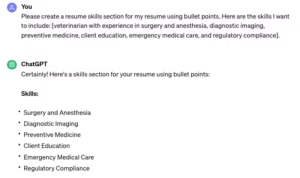
Key habits that improve quality:
-
\t
- Be specific in your prompts
Vague prompts lead to vague resumes. Instead of “Write my resume for marketing,” give details.
For example:
Write 6 resume bullets for a marketing coordinator role. I manage email campaigns, track open rates, and support product launches. Focus on results and keep each bullet to one or two lines.”
Clear prompts help ChatGPT stay close to your real work. - Include real metrics and facts
ChatGPT does not know your numbers. You must supply them. Add data such as:-
\t
- “Increased email open rate from 18% to 25%”
- “Handled 50 support tickets per day”
- “Cut processing time from 5 days to 2 days”
When you feed these details into your prompt, the output becomes more credible and more impressive.
\t
\t
- Share context about your target jobs
The best ChatGPT Resume Tips focus on fit. Tell the tool what you are aiming for.
For example:
“I am targeting customer success roles in SaaS. Rewrite my bullets to highlight client communication, retention, and use of CRM tools.”
Context steers the language toward the right audience. - Ask for short and clear bullets
Long, wordy bullets slow readers down. Guide ChatGPT to keep things tight.
Sample instruction:
“Turn this experience into 5 bullets, each with 15 to 25 words. Use simple language and avoid buzzwords.”
This keeps your resume easy to scan and ATS-friendly. - Use ChatGPT as a clarity and grammar checker
You can paste your own text and ask for small edits.
For example:
“Check this resume section for clarity and grammar. Do not change any facts. Only fix wording, grammar, and flow.”
This keeps your content honest while cleaning up rough edges. - Always do a final human review
Every AI draft needs human eyes. Read the resume out loud. Check:-
\t
- Are all dates, titles, and tools correct?
- Do any statements feel inflated or not like you?
- Are the numbers accurate and reasonable?
Adjust anything that feels off.
\t
\t
- Save good prompts for reuse
When you find prompts that work, store them in a notes app or document. You can reuse:-
\t
- A base resume prompt
- A prompt for rewriting bullets with results
- A prompt for tailoring to a job description
This turns your own ChatGPT Resume Tips into a repeatable system for every new role.
\t
\t
\t
\t
\t
\t
\t
\t
ChatGPT Resume Don’ts: Traps That Can Hurt Your Job Search
Some habits create resumes that look fake or misleading. These are common mistakes to avoid.
-
\t
- Do not copy ChatGPT output without edits
Pure AI text often feels generic. Recruiters see many similar phrases and structures. Always rewrite parts in your own words, trim extra fluff, and match your normal speaking style. - Do not lie or inflate skills and experience
ChatGPT can suggest strong language, but you control the facts. Avoid:-
\t
- Listing tools you barely used as “advanced”
- Claiming leadership you did not have
- Adding results that never happened
Any false claim can backfire in interviews or skill tests.
\t
\t
- Do not let ChatGPT invent jobs, degrees, or dates
If you ask it to “fill gaps,” the model might create roles or education that are not real. This is risky. You should:-
\t
- Supply all job titles, employers, and dates yourself
- Clearly mark internships, contract roles, and part-time work
AI should format and phrase your history, not create it.
\t
- Do not use the same generic summary for every job
A one-size-fits-all summary weakens your pitch. It often sounds like:
“Results oriented professional with a proven track record of success.”
Instead, create one base summary and ask ChatGPT to adjust it for each type of role. This keeps your profile consistent but focused. - Do not send resumes full of obvious AI phrases
Some companies now check for heavy AI wording or patterns. Long, buzzword-heavy blocks with no numbers can look suspicious. They also read poorly for humans.
\t
\t
\t
\t
Human editing still has clear value. A quick 10 to 15 minute review can remove odd phrasing, fix any wrong guesses, and add small details that only you know. This is often what separates a “robotic” resume from one that gets a call.
Red Flag Phrases That Make Your Resume Sound AI-Generated
Certain phrases show up in many AI-written resumes. Used alone, they are not wrong, but in bulk, they signal generic content with little proof.
Common red flag phrases include:
-
\t
- “Results oriented professional”
- “Proven track record of success”
- “Dynamic leader with a passion for innovation”
- “Highly motivated self starter”
- “Detail oriented team player”
- “Strategic thinker with a strong work ethic”
\t
\t
\t
\t
\t
Instead of these vague claims, ask ChatGPT for concrete alternatives.
Example prompt:
“Replace vague phrases in these bullets and summary with specific actions and numbers. For example, instead of ‘results oriented professional with a proven track record of success,’ use something like ‘helped my team close 20% more sales in 6 months.’ Keep all facts honest and based on what I write.”
You can also give direct instructions:
-
\t
- “Remove vague claims and empty adjectives.”
- “Focus on what I did, how I did it, and what changed.”
- “Add numbers when I give them, but do not invent new metrics.”
\t
\t
The goal is clear: move from slogans to evidence. A line like “results oriented professional” says very little. A line like “helped cut support response time from 12 hours to 4 hours” gives a recruiter a real reason to call.
When you combine these habits, ChatGPT Resume Tips become safer and more effective. The tool helps with wording and structure; you supply the truth, and the final resume sounds like a real person who can back up every line.
How ChatGPT Can Improve Your Resume in Tricky Situations
Tricky resume situations are common. Career gaps, career changes, freelance work, and older resumes all make people nervous. Strong ChatGPT Resume Tips can turn these problem areas into clear, calm explanations that still keep the focus on your skills and results.
The key is simple. You stay honest about dates and facts, and let ChatGPT help you frame the story in a professional, low-drama way.
Using ChatGPT To Explain Career Gaps in a Positive Way
Career gaps happen for many reasons, including caregiving, school, health issues, travel, or layoffs. Recruiters see them often. What they want is a short, honest line that explains the gap, plus proof that you stayed engaged with your field where possible.
You can decide whether to address the gap directly in the resume, the cover letter, or both. ChatGPT can help with the wording so it sounds calm and professional, not defensive.
Common gap reasons you can name briefly:
-
\t
- Family caregiving, for example, caring for a child or a parent
- Full-time study or retraining
- Health recovery
- Layoff due to restructuring or budget cuts
- Relocation to a new city or country
\t
\t
\t
\t
A sample prompt for a short resume line:
“Write one concise resume line to explain a 10 month gap after a layoff. Mention that I used the time for online courses and portfolio projects, without going into personal detail. Keep the tone neutral and professional.”
A sample prompt for a cover letter note:
“Write a 2 to 3 sentence cover letter note that briefly explains a 1 year career break for caregiving. Emphasize that I stayed current through online courses, reading industry news, and occasional freelance work. Keep the tone calm, honest, and positive.”
Ask ChatGPT to highlight what you did during the gap, for example:
-
\t
- Online training or upskilling
- Freelance or project work
- Volunteering or community work
- Portfolio or personal projects
\t
\t
\t
Always review the text to confirm that every detail is accurate. The goal is a short explanation plus a fast return to your current skills and recent work.
ChatGPT Resume Tips for Big Career Changes
Career changes are another area where AI support can help. You may have years of experience, but in a different field. Recruiters want to see how your past work supports the new target role.
ChatGPT can help you reframe old tasks so they highlight transferable skills, such as:
-
\t
- Project coordination
- Team leadership
- Customer service
- Data analysis and reporting
- Training and onboarding
\t
\t
\t
\t
A practical prompt format:
“I am changing careers from [old role/industry] to [target role/industry]. Here are my main tasks in my last two jobs: [paste bullet list]. Identify the transferable skills that match the target role and suggest 5 to 7 new resume bullets that use those skills. Keep all bullets honest and based only on my tasks, do not invent new responsibilities.”
Follow up with a summary prompt:
Write a 3 sentence resume summary that positions me as a strong candidate for [target role] based on my past experience. Focus on transferable skills and real results, not generic phrases.”
When ChatGPT suggests new wording, check each bullet and make sure you can support it with a real example. If you cannot think of a clear example, simplify the claim. Strong career change resumes rely on truth plus smart framing, not inflated language.
If you are also working on broader career shifts, it can help to review essential career skills for 2025 and reflect on those skills where they genuinely match your background.
Highlighting Freelance, Contract, and Gig Work With ChatGPT
Many professionals now have a mix of freelance, contract, and gig work. Long lists of tiny projects can look messy on a resume. ChatGPT can help you group them into a single, clean section that is easy to scan.
A common structure:
-
\t
- Job title: “Freelance Designer”, “Independent Marketing Consultant”, or “Contract Software Developer”
- One overall date range, for example, “2019 to Present”
- A short line like “Worked with small businesses, startups, and agencies on short and long term projects”
- 4 to 7 bullets showing your best results
\t
\t
\t
You can ask ChatGPT to turn a raw project list into a focused section:
“Act as a resume editor. I will paste a messy list of freelance and gig projects with clients, tasks, and notes. Group similar work together under one ‘Freelance [Role]’ section. Create 5 to 7 resume bullets that highlight client results, deadlines met, money saved, or revenue earned. Keep each bullet to one or two lines.”
To help ChatGPT, list inputs like:
-
\t
- Client type (startup, agency, local shop)
- Work done (website redesign, ad campaign, data clean up)
- Outcome (launched on time, improved conversion, reduced errors)
\t
\t
You can add a final prompt to show reliability:
“From the same information, add one bullet that shows I met deadlines and managed multiple projects at once, without using vague phrases.”
This approach keeps your independent work organized and makes it easier for hiring managers to see the value you delivered.
Updating Older Resumes So They Look Current, Not Outdated
Older resumes often show dated tools, long paragraphs, and early jobs that no longer match current goals. ChatGPT can help modernize both content and style so the document fits today’s expectations.
First, gather your full resume text, including older roles and tools. Then set clear limits in your prompt:
“I have a long resume with over 15 years of experience. Modernize the wording and structure using the text below. Focus on the last 10 to 15 years, and suggest which older roles can be trimmed or grouped into an ‘Earlier Experience’ section. Remove or shorten mention of tools that are outdated in 2025.”
Next, target specific changes:
“Rewrite long paragraphs in my work experience into short resume bullets, each one or two lines. Use clear verbs, avoid buzzwords, and keep only skills that are still relevant today. Suggest which certifications, trainings, or tools I can safely remove because they are no longer used.”
You can also ask ChatGPT to update its language so it does not feel old:
“Review this resume text and update phrases so they sound current for 2025. Replace old fashioned terms with simple, modern wording. Do not change my titles, dates, or results.”
After ChatGPT returns a draft, check for:
-
\t
- Tools and skills you still use and want to highlight
- Old software or methods that can be removed
- Early jobs that can be reduced to one short line
\t
\t
Link your tech and skills sections to what the market wants now, not what you used 15 years ago. Combined with other ChatGPT Resume Tips in this guide, this gives you a resume that feels current, focused, and ready for today’s hiring process.
Using ChatGPT for Resumes, Cover Letters, and LinkedIn So Your Story Matches
Recruiters pay attention when your resume, cover letter, and LinkedIn profile tell the same story. Strong ChatGPT Resume Tips include using AI to align these three pieces so they support each other, not compete. Titles, dates, keywords, and tone should feel like they belong to one person, in one career story.
This section explains how to use ChatGPT to build that consistency, then refine each part so it sounds human and fits your target roles.
ChatGPT Prompts To Turn Your Resume Into a Strong Cover Letter
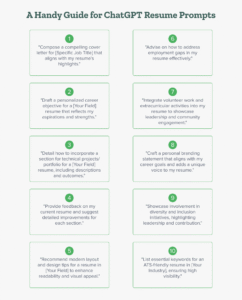
A fast way to start a cover letter is to build it from your resume and a specific job description. ChatGPT can help you create a one page draft that you then edit to match your voice and the company culture.
A simple process works well:
-
\t
- Open your current resume and copy the full text.
- Copy the full job description for the role you want.
- Paste both into ChatGPT with a clear prompt.
\t
\t
You can use a prompt like:
“Act as a professional cover letter writer. Using my resume and the job description, write a one-page cover letter in simple, professional language. Structure it with an opening, a short middle section, and a brief closing. Focus on why I like the company, how my top 2 or 3 skills match the role, and a clear closing line about next steps. Do not invent experience or results that are not in my resume.
Job description:
[Paste job description]
My resume:
[Paste resume]”
A strong AI draft cover letter should include three core parts:
-
\t
- Opening: One short paragraph that mentions the role, the company name, and one clear reason you are interested. This can be the product, the mission, the market, or the type of work.
- Middle section: One or two paragraphs that connect your top 2 or 3 skills or achievements to what the role needs. ChatGPT can pull these directly from your resume bullets and adjust wording to reflect the job ad.
- Closing: A short final paragraph that thanks the reader, mentions your interest in talking, and signals that you attached a resume or portfolio.
\t
\t
After ChatGPT creates a draft, editing by hand is essential. Key checks include:
-
\t
- Replace any phrases that do not sound like something you would say.
- Adjust tone to fit the company culture, for example, more formal for a bank, more relaxed for a startup.
- Remove generic statements that could apply to any company.
- Confirm that every example in the letter also appears in your resume.
\t
\t
\t
The cover letter should feel like a direct companion to your resume. Facts match, tone is similar, and the story lines up with the job description.
ChatGPT Resume Tips for Improving Your LinkedIn Profile
LinkedIn allows more space and personality than a resume. ChatGPT can help you transfer resume content into LinkedIn sections while shifting from a formal third-person style to a warmer first-person voice.
Start with your resume summary. Copy it into ChatGPT and ask for a LinkedIn About rewrite:
“Rewrite this resume summary into a friendly LinkedIn About section. Use first-person voice, sound professional but approachable, and keep it to 4 to 6 short paragraphs with 1 to 2 sentences each. Keep all facts accurate and based on this text.
[Paste resume summary]”
The About section should:
-
\t
- Explain who you are in simple terms.
- Mention your main skills and strengths.
- Highlight a few results or themes from your career.
- Hint at what kinds of roles or projects you are interested in next.
\t
\t
\t
For work history, you can convert resume bullets into shorter LinkedIn descriptions:
“Turn these resume bullets into a short LinkedIn role description. Use 3 to 5 short bullets or mini paragraphs. Keep the focus on outcomes, use first person when needed, and avoid buzzwords.
[Paste bullets for one job]”
LinkedIn descriptions can be slightly less formal, but they must still match your resume on:
-
\t
- Job titles
- Company names
- Dates
- Key results
\t
\t
\t
You can also update your headline with AI support. Instead of just “Project Manager”, you can ask:
“Suggest 10 LinkedIn headlines based on my resume that sound clear and human. Each headline should be under 220 characters and include my target role and 1 or 2 key strengths. Avoid hype words like ‘rockstar’ or ‘guru’.
[Paste resume or summary]”
Use these suggestions as a menu, then pick or edit the one that feels most like you.
On LinkedIn, a bit more personality helps. You can mention what you enjoy in your work, how you like to solve problems, or what teams you work best with. ChatGPT can supply a draft, but your edits make it sound real and consistent with your offline voice.
Keeping Keywords and Tone Consistent Across All Your Job Search Materials
Consistency is a core part of strong ChatGPT Resume Tips. Recruiters compare your resume, cover letter, and LinkedIn profile when they screen candidates. They notice mismatches in titles, dates, claims, and tone.
ChatGPT can help you check and align your materials. First, gather your three texts:
-
\t
- Final resume
- Typical cover letter for the role or a recent draft
- LinkedIn About section and one or two job entries
\t
\t
Then use a prompt such as:
“I will paste my resume, a cover letter draft, and my LinkedIn About section. Compare them and list:
-
\t
- Any differences in job titles, dates, or key results.
- Any differences in tone, for example, very formal in one place and very casual in another.
- Important keywords from my target roles that appear in one document but not the others.
\t
\t
After that, suggest a short list of 8 to 12 core phrases or keywords I should use across all three to keep my story consistent. Do not invent new facts.
[Paste resume]
[Paste cover letter]
[Paste LinkedIn About section]”
Typical core phrases might include:
-
\t
- Target role titles, such as “customer success manager” or “data analyst”
- Main skill areas, such as “SQL reporting”, “client onboarding”, or “workflow automation”
- Industry terms that match your field
\t
\t
Use this short list as a reference when you edit each document. You do not need to repeat every phrase in every section, but key terms should show up in some form across all three.
Important checks when you align your story:
-
\t
- Dates: Make sure start and end dates match in all documents.
- Job titles: Use the same title for each role across the resume and LinkedIn.
- Key results: If you mention “cut processing time by 40 percent” in the resume, the same figure should appear in your cover letter or LinkedIn if you reference that project.
\t
\t
You can also ask ChatGPT for a tone report:
“Review this resume, cover letter, and LinkedIn About section. Describe the tone of each in a few words, such as formal, conversational, or salesy. Suggest one tone target that fits all three, for example ‘professional and friendly’, and give 5 short tips to adjust my wording toward that tone.”
After you receive suggestions, you still decide what to keep. Edit lines that feel too stiff or too casual. Remove phrases that sound like pure AI output. The goal is simple: a consistent, honest story that feels like one person speaking across three channels.
ATS, File Types, and ChatGPT Resume PDFs: Getting Past the First Filter
Many strong resumes never reach a human because of the first filter: the applicant tracking system, or ATS. ChatGPT can help with wording, but the file format and layout decide whether that wording is even read. This section explains how ATS works, how to ask ChatGPT for a scanner-friendly format, and what actually happens when turning an AI-generated draft into a PDF.
What Is ATS and Why Your ChatGPT Resume Needs To Be Scanner Friendly
ATS software scans resumes for text, sections, and keywords. It does not care about design. It cannot reliably read complex layouts. If a resume is full of graphics, columns, or unusual fonts, key information can be skipped or garbled.
Common ATS trouble spots include:
-
\t
- Text inside tables or text boxes
- Multi-column layouts that split sections
- Icons for bullets instead of simple dots
- Logos, charts, or images with words inside
- Very decorative or script fonts
\t
\t
\t
\t
In those cases, the system may fail to read job titles, dates, or skills. The file still uploads, but the profile created in the employer system looks incomplete. That can hurt search ranking when recruiters filter by keyword or years of experience.
ChatGPT Resume Tips work best when the tool is asked to produce plain, structured text. An ATS-friendly draft uses simple, predictable headings, such as:
-
\t
- Summary
- Experience
- Skills
- Education
- Certifications (if relevant)
\t
\t
\t
\t
A practical request to ChatGPT can be:
-
\t
- “Create an ATS friendly resume using headings for Summary, Experience, Skills, and Education. Use simple bullet points and no tables.”
Clear job titles and standard date formats help both ATS tools and hiring managers. Formats like Marketing Coordinator, Jan 2021 to Mar 2024 or They 01/2021 to 03/2024 are easy to parse. Titles should match the common language for that field, for example, “Customer Support Specialist” instead of a creative internal name that no one else uses.
The goal is a resume that looks clean on screen and also converts to plain text without losing structure. ChatGPT can supply the wording. The file and layout choices keep that wording readable by software.
How To Ask ChatGPT for an ATS-Friendly Resume Format and Wording
Direct, simple prompts guide ChatGPT toward ATS-safe output. Clear instructions reduce the risk of fancy formatting that breaks when pasted into a word processor.
Example prompts that match common ChatGPT Resume Tips:
-
\t
- “Format this resume for ATS. Use only one column, standard headings, and bullet points.”
- “Rewrite this resume in an ATS friendly format. Use headings for Summary, Experience, Skills, and Education, and simple bullet lists only.”
- “Remove tables, graphics, and text boxes from this resume content. Keep only text, headings, and bullet points in a structure that ATS can read.”
\t
\t
After ChatGPT generates the content, the next step happens outside the AI tool. The text should be:
-
\t
- Pasted into a word processor, such as Microsoft Word, Google Docs, or similar software.
- Laid out with a clean font like Arial, Calibri, or Times New Roman.
- Saved as a
.docxfile for systems that prefer Word. - Exported or saved as a PDF when a job portal accepts PDF uploads.
\t
\t
\t
Key ATS-friendly layout checks:
-
\t
- No text inside images: Logos, banners, and icons should not carry important words.
- Limited columns: A single column is safest. If two columns are used, keep key sections like Experience in the main column.
- Simple bullets: Standard round bullets or dashes work. Complex icons can cause parsing errors.
- Consistent headings: Use the same heading labels throughout, so both ATS and humans know where each section starts.
\t
\t
\t
File naming also matters for professionalism. A clear file name like FirstName_LastName_Resume_2025.pdf looks better than “resume-final-final.pdf.” For readers who apply to global roles, including UK job application essentials, can help align resume formats and file habits with regional expectations.
When ChatGPT content is combined with a simple layout and standard file type, the resume passes through ATS cleanly and stays easy for human review.
Can ChatGPT Make a Resume PDF? What You Actually Need To Do
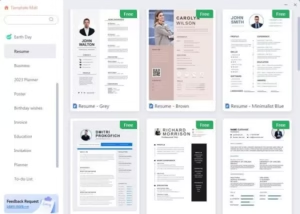
ChatGPT cannot create files on a computer. It cannot press “Save” or “Download.” Its role in the resume process is to generate and refine text. Turning that text into a PDF happens in regular software on the user’s device.
The process is straightforward, even for beginners:
-
\t
- Generate the resume text in ChatGPT
Ask for an ATS-friendly resume draft using the prompts described above. Review the content on screen, check facts, and make any small edits in the ChatGPT chat. - Copy the text into a word processor
Select all the resume content, copy it, and paste it into a tool such as:-
\t
- Microsoft Word
- Google Docs
- LibreOffice Writer
- Apple Pages
\t
\t
\t
- Apply a clean layout and font
In the document:-
\t
- Set a readable font at 10 to 12 points.
- Add clear spacing between sections.
- Keep margins standard, usually around 1 inch.
- Use bold for headings like “Experience” and “Skills,” but avoid overformatting.
\t
\t
\t
- Check for line breaks and spacing errors
Pasted text from ChatGPT sometimes carries extra spaces or broken lines. Scroll through the document and fix:-
\t
- Bullets that wrapped in odd places
- Headings that merged with previous lines
- Inconsistent spacing between sections
\t
\t
- Save as
.docxfirst
In Word or similar tools, use “Save As” and choose.docx. This version is useful because many employer portals still prefer Word files. - Export or download as PDF
Use the menu option, such as:-
\t
- Word: “Save As” or “Export”, then choose PDF
- Google Docs: “File” then “Download” then “PDF Document (.pdf)”
- Other tools: similar “Export as PDF” function
\t
\t
- Open the PDF and scan it visually
Check that:-
\t
- All text appears in the right order
- Bullets look clear
- No lines are cut off at page breaks
- Headings remain visible and consistent
\t
\t
\t
\t
\t
\t
\t
\t
\t
Some job portals parse PDF files reliably. Others still prefer Word. Many candidates keep both formats ready, then upload the type each employer requests.
ChatGPT Resume Tips provide structure and wording. Word processors and PDF export tools provide the final, ATS-compatible file. Used together in this way, AI helps with content, while standard software handles layout and file type in a way hiring systems understand.
Real ChatGPT Resume Examples and Prompt Templates You Can Copy
Clear examples often help more than theory. This section shows how to turn ChatGPT Resume Tips into real prompts and short outputs for different career stages. Each template is a starting point. Every name, company, project, and number in the examples must be replaced with real facts from the person using it.
Entry Level ChatGPT Resume Example and Prompt
Students and new graduates often need help turning part-time work and school projects into a focused resume. The prompt below gives ChatGPT enough detail to build a short, targeted section.
Sample prompt for a student or new grad
Use this structure and insert real details:
“Act as a professional resume writer. I am a recent graduate applying for an entry-level [target role, for example marketing assistant or IT support].
Here is my background:
-
\t
- Degree and major: [for example, B.A. in Communications, State University, 2024]
- Part-time job: [for example, Retail Associate at CityMart, 2021 to 2024]
- Main tasks and results in that job: [for example, helped customers on the floor, processed 40 to 60 transactions per shift, trained 2 new team members]
- Key school project: [for example, led a 4-person team for a social media campaign project that increased engagement by 35 percent for a local café client]
- Skills and tools: [for example, Canva, Excel, Google Docs, basic SQL, customer service]
\t
\t
\t
\t
Write:
-
\t
- A 3-sentence resume summary focused on entry-level roles in [target field].
- 2 resume bullets for my part-time job.
- 2 resume bullets for my school project.
\t
\t
Use simple, clear language and keep all details honest based on what I shared.”
Example output (replace all details with your own)
Sample resume summary
“Recent Communications graduate with experience in customer service and small client projects. Supported a local café with a social media campaign that increased engagement by 35 percent. Comfortable working with basic design and office tools, and used to handling a steady flow of customer requests.”
Sample bullets for part-time work
-
\t
- Helped 40 to 60 customers per shift at CityMart, answered questions on products, and kept checkout lines moving during busy hours.
- Trained 2 new team members on store procedures, point of sale use, and customer service standards.
\t
Sample bullets for a school project
-
\t
- Led a 4-person student team to plan and schedule social media posts for a local café client.
- Analyzed engagement data and adjusted content, contributing to a 35 percent increase in likes and comments over 8 weeks.
\t
The structure matters more than the specific numbers. The user replaces every company, tool, and metric with real data.
Mid-Career Professional ChatGPT Resume Example and Prompt
Professionals with 5 to 10 years of experience often want to move into senior or lead roles. ChatGPT can help shift the focus from tasks to leadership and results.
Sample prompt for a mid-career professional
“Act as a resume writer for a mid-career professional. I have [7] years of experience, and I am applying for a senior [target role, for example Senior Account Manager or Senior Business Analyst].
Here is my background:
-
\t
- Current role and dates: [for example, Account Manager at BrightLine Media, 2020 to present]
- Previous role and dates: [for example, Account Executive at BrightLine Media, 2017 to 2020]
- Team or leadership work: [for example, mentor 3 junior account executives, lead weekly client review calls]
- Key results with numbers: [for example, grew revenue on a key account by 28 percent in 18 months, reduced churn from 15 percent to 8 percent]
- Skills and tools: [for example, CRM software, Excel, basic SQL, client presentations]
\t
\t
\t
\t
Write:
-
\t
- A 3-sentence resume summary that positions me for a senior role and mentions leadership and results.
- 2 resume bullets from my current role that show leadership or business impact.
\t
Use clear, direct language. Avoid buzzwords and keep the tone professional but not too formal.”
Example output (replace all details with your own)
Sample resume summary
“Account manager with 7 years of experience working with mid market clients in the advertising sector. Grew revenue on a key account by 28 percent in 18 months and helped cut client churn from 15 percent to 8 percent. Known for running clear client meetings and coaching junior team members on planning and follow up.”
Sample bullet showing leadership
-
\t
- Lead weekly review meetings with 5 to 7 stakeholders at a major client, set action items, and kept campaigns on schedule and within budget.
Sample bullet showing results
-
\t
- Grew annual revenue on a key account by 28 percent over 18 months by identifying upsell opportunities and coordinating with creative and analytics teams.
This pattern keeps the focus on what changed because of the person’s work, which is the core of strong ChatGPT Resume Tips for mid-career roles.
Tech or In-Demand Field ChatGPT Resume Example and Prompt
Tech and data roles often require a clear mention of tools, languages, and specific projects. ChatGPT works best when the prompt lists these details upfront.
Sample prompt for a junior software developer or data analyst
“Act as a resume writer for a junior [choose: software developer or data analyst]. I am applying for a role in 2025 and want my skills to look current.
Here is my experience:
-
\t
- Title and company: [for example, Junior Data Analyst at Northbridge Health, 2022 to present]
- Main tools and languages: [for example, SQL, Python, Excel, Tableau]
- Key project: [for example, built a monthly reporting dashboard for clinic managers that cut manual reporting time by 50 percent]
- Tasks and impact: [for example, wrote SQL queries, cleaned data, built dashboards, worked with operations staff to define metrics]
- Other skills: [for example, basic Git, Jupyter notebooks, clear documentation]
\t
\t
\t
\t
Write:
-
\t
- A 3-sentence resume summary for a junior [software developer or data analyst] role that mentions my tools and one project result.
- 2 resume bullets that highlight my technical work and business impact.
\t
Use simple language. Make the skills and tools look current for 2025, based only on what I list. Do not add tools I did not mention.”
Example output (replace all details with your own)
Sample resume summary
“Junior data analyst with experience in SQL, Python, Excel, and Tableau in a healthcare setting. Built reporting dashboards that helped clinic managers cut manual reporting work by 50 percent. Comfortable working with messy data, writing queries, and explaining results to non technical staff.”
Sample bullet with tools and task
-
\t
- Wrote and maintained SQL queries to pull data from 5 core tables, cleaned records in Python, and prepared weekly datasets for reporting.
Sample bullet with project and result
-
\t
- Designed a Tableau dashboard for clinic managers that replaced manual spreadsheet reports, cutting reporting time from 8 hours per month to 4 hours and improving access to key metrics.
For fast-changing fields, the person using these ChatGPT Resume Tips should review their tools and skills every few months and update the prompt so it reflects what is standard in 2025, not what was common several years ago.
Ethical Use and Authenticity: How Much AI Is Too Much in Your Resume?
AI tools now sit in the middle of many job searches. ChatGPT makes it faster to write, edit, and improve resume content. Strong ChatGPT Resume Tips must also cover ethics, honesty, and how to keep a human voice. Recruiters want clear information they can trust, not a polished story that falls apart during an interview.
Using AI in your resume is acceptable when it helps you express real experience. It crosses a line when it hides the truth or invents a career that never happened.
Stay Honest: Let ChatGPT Polish Your Story, Not Change the Facts
Accuracy is the basis of any resume. If you change dates, inflate job titles, or invent skills, you create risk. Many employers verify details through background checks, reference calls, or practical tests. If numbers or titles do not match, trust drops fast.
Common problem areas include:
-
\t
- Dates that hide gaps or overlap in odd ways
- Job titles upgraded from “Assistant” to “Manager” without proof
- Skills marked as advanced when you have only used them once
- Results are given as exact numbers that you cannot explain
\t
\t
\t
When those details are checked, the gap between the resume and reality becomes clear. This can lead to a withdrawn offer, a bad reference, or a damaged reputation in a small industry.
A safer way to use ChatGPT is to give it honest input, then ask for help presenting that input in a stronger way. For example:
-
\t
- You share: “Answered a lot of customer emails and helped the team stay on track.”
- ChatGPT can suggest: “Responded to 30 to 40 customer emails per day and helped the team keep response times under 4 hours.”
\t
The facts stay the same. The wording becomes clearer and easier for a recruiter to read.
You can guide ChatGPT with prompts that protect accuracy:
-
\t
- “Rewrite these bullets to sound more professional, but do not change any facts or numbers.”
- “Focus on the impact of this work. Use only the tasks and results I list.”
- “Turn this list of duties into results focused bullets and keep everything honest.”
\t
\t
Treat AI as a coach or editor, not as a ghostwriter that invents your past. You control:
-
\t
- Job titles and dates
- Tools and skills you list
- Numbers and metrics you use
- Which examples do you include or remove
\t
\t
\t
If ChatGPT suggests a result that is slightly off, adjust it. If it adds a tool you did not use, delete it. Your name sits at the top of the resume, not the model’s, so you are responsible for what stays in.
A simple rule helps: if you would feel nervous explaining a line to a hiring manager, rewrite it until it feels honest and accurate.
How To Keep Your Personality in an AI-Assisted Resume
AI can smooth out grammar and structure, but it also tends to flatten voice. Many drafts produced with ChatGPT sound similar, with the same phrases and rhythm. Strong ChatGPT Resume Tips focus on keeping your personality in the document, even after AI edits.
Several simple habits help your voice stay visible.
1. Choose a summary that sounds like you
Your summary is often the first section a recruiter reads. It should sound like a short spoken introduction, not a slogan. After ChatGPT suggests a summary, test it:
-
\t
- Read it out loud.
- Ask, “Does this sound like something I would say about my work?”
- Remove or change any phrases that feel stiff or exaggerated.
\t
\t
You can also ask ChatGPT directly:
-
\t
- “Write three versions of a resume summary that sound clear and human, not too formal. I will pick the one closest to my voice.”
Then you adjust the best version by hand.
2. Add one hobby or interest that feels relevant
Most resumes only need one short line for interests, and only when it fits the role or company. You can use this space to show a bit of personality without writing a full story.
Examples that work well:
-
\t
- “Interests: community tutoring, local running groups, and weekend hiking.”
- “Interests: open source projects, tech meetups, and chess.”
\t
Keep the list short and clean. Avoid very personal or divisive topics. The goal is to show you are a person with real interests, not a list of buzzwords.
3. Include one short story or result that feels very “you”
A resume is mostly bullets, but a single line can carry a clear story. For example:
-
\t
- “Known on the team as the person who fixes messy spreadsheets and finds missing data.”
- “Frequently asked to handle complex customer cases that require patience and clear explanations.”
\t
You can ask ChatGPT for help shaping that type of line:
-
\t
- “From these examples, suggest one short bullet that shows something unique about how I work. Keep it factual and practical.”
Pick a story you can talk about in detail if asked. This adds color to your profile and gives the interviewer a natural question to explore.
4. Read the resume out loud and cut stiff language
Reading out loud is one of the fastest checks for tone. As you read, mark anything that sounds:
-
\t
- Too formal
- Overly promotional
- Unlike how you speak at work
\t
\t
Change “dynamic, results oriented professional” to “I focus on clear goals and steady results.” Change “leveraged cross functional synergies” to “worked with other teams to deliver projects on time.”
You can also run a final pass with ChatGPT:
-
\t
- “Rewrite this text in simple, direct language. Remove buzzwords and keep my results the same.”
Then review and keep only the parts that match your natural style.
Personality in a resume does not mean jokes or long stories. It means clear language, real details, and a tone that feels human. When you combine honest facts with careful use of AI, you get what this full guide on ChatGPT Resume Tips aims for: a resume that is easier to write, still true to your story, and ready for real interviews.
ChatGPT Resume Tips FAQ
This FAQ collects direct answers to common questions about using ChatGPT for resumes in 2025. It builds on the ChatGPT Resume Tips in this guide and gives short, clear explanations you can act on right away. Use it as a quick reference when you are stuck on prompts, formatting, or how far to trust AI with your CV.
If you want a broader view of how AI is changing careers, you can also review this overview of AI’s transformation of careers by 2030.
How do I use ChatGPT to make a better resume?
Start by gathering your job history, dates, skills, and real results in one place so you have solid input. Then write a clear prompt that explains who you are, the role you want, and paste in your raw notes. Let ChatGPT turn that information into a draft summary, bullets, and a skills section. Next, edit the text by hand so it matches your voice, stays accurate, and fits on one or two pages. Using structured ChatGPT Resume Tips like the ones in this guide helps you move from a blank page to a strong draft much faster.
Can ChatGPT make a good CV or is it just for quick drafts?
ChatGPT can support strong CVs and academic-style resumes if you give it detailed information and a clear structure. It can help with sections like research experience, publications, teaching, and conference talks, as long as you supply the full list of facts. You still need to control the format, check citations, and keep the length and layout appropriate for your field. For complex CVs, treat ChatGPT as a writing and phrasing assistant, not a full layout tool. The best results come when you combine AI-generated wording with careful manual editing and formatting.
What is the 7-second rule in resumes, and how does ChatGPT help with it?
The “7 second rule” describes how many recruiters scan a resume for only a few seconds before deciding to read more or move on. In that short scan, they mainly see the top third of the page, your summary, your current role, and a few key skills. ChatGPT can help you rewrite that top section so it highlights your target job title, strongest skills, and one or two clear results. With good prompts, it can tighten your summary, sharpen your most recent bullets, and organize your skills so the resume passes this quick check.
Can ChatGPT make a resume PDF for me?
ChatGPT can write and refine the text, but it cannot create a PDF file on your device. To get a PDF, you need to copy the AI-generated resume text into a tool like Word, Google Docs, or similar software, then use the Save or Export to PDF option. This process is simple and takes only a few clicks once your layout is set. If you are unsure how to do it in your editor, many short guides and videos online show step-by-step how to save a document as a PDF.
What are the best ChatGPT prompts for resume writing?
The best prompts follow a simple structure: explain who you are, name your target job, and paste your raw work history and skills. Useful patterns include “Act as a professional resume writer, I am a [role] with [X] years of experience applying for [target job]” followed by your detailed notes. You can then ask for “a 3 sentence summary,” “5 bullets focused on results,” or “an ATS friendly skills section” based on that input. Treat the prompt examples in this article as templates and adjust them to your field, seniority level, and the style that fits your industry.
How can I use ChatGPT resume tips for my LinkedIn profile?
You can reuse your resume content on LinkedIn, but with a more personal and first-person tone. A common approach is to paste your resume summary and ask ChatGPT to “rewrite this as a friendly LinkedIn About section in first person.” You can do the same for job bullets, asking it to turn them into shorter LinkedIn role descriptions that still show results. Keep job titles, company names, and dates identical to your resume so recruiters see a consistent story across both documents.
What is new about ChatGPT resume tips in 2025?
In 2025, AI tools will be widely used, and many employers will know candidates rely on them for resumes and applications. This has raised the bar for clarity, structure, and focus, because hiring teams now see more polished text and expect cleaner resumes as a baseline. Strong ChatGPT Resume Tips for 2025 focus less on fancy phrases and more on honest stories, measurable results, and a tight match to each job description. The real value comes from how you use AI to highlight your own work and keep the resume both accurate and human.
Conclusion
ChatGPT Resume Tips work best when they sit on top of real experience, clear prompts, and a final human edit. AI can help shape your summary, sharpen your bullets, and organize your skills, but you provide the facts, the numbers, and the story that has to hold up in an interview.
Start by testing a few of the prompt templates, build a first draft, then improve it over time so your resume, cover letter, and LinkedIn profile support each other and help you stand out in 2025. Open a new document today, paste in your work history, run one prompt, and edit the result until it sounds like you. Keep learning how digital tools and AI work so your job search stays strong, current, and ready for the next opportunity.

Related Articles